Table bookings for independent restaurants, bars and cafés

Every table, seated

The diary, the floor plan, your regulars and the queue at the door, in one calm screen. Built for the Friday rush, and the quiet Tuesday before it.

First month free, then £29.99 a month. No card to start, no contract.

The Seated diary at 19:40 on a busy night: tables down the side, bookings across, a red line at the time now, seated tables in plum, a late booking in red, and the service panel with the waitlist on the right The same diary in dark mode
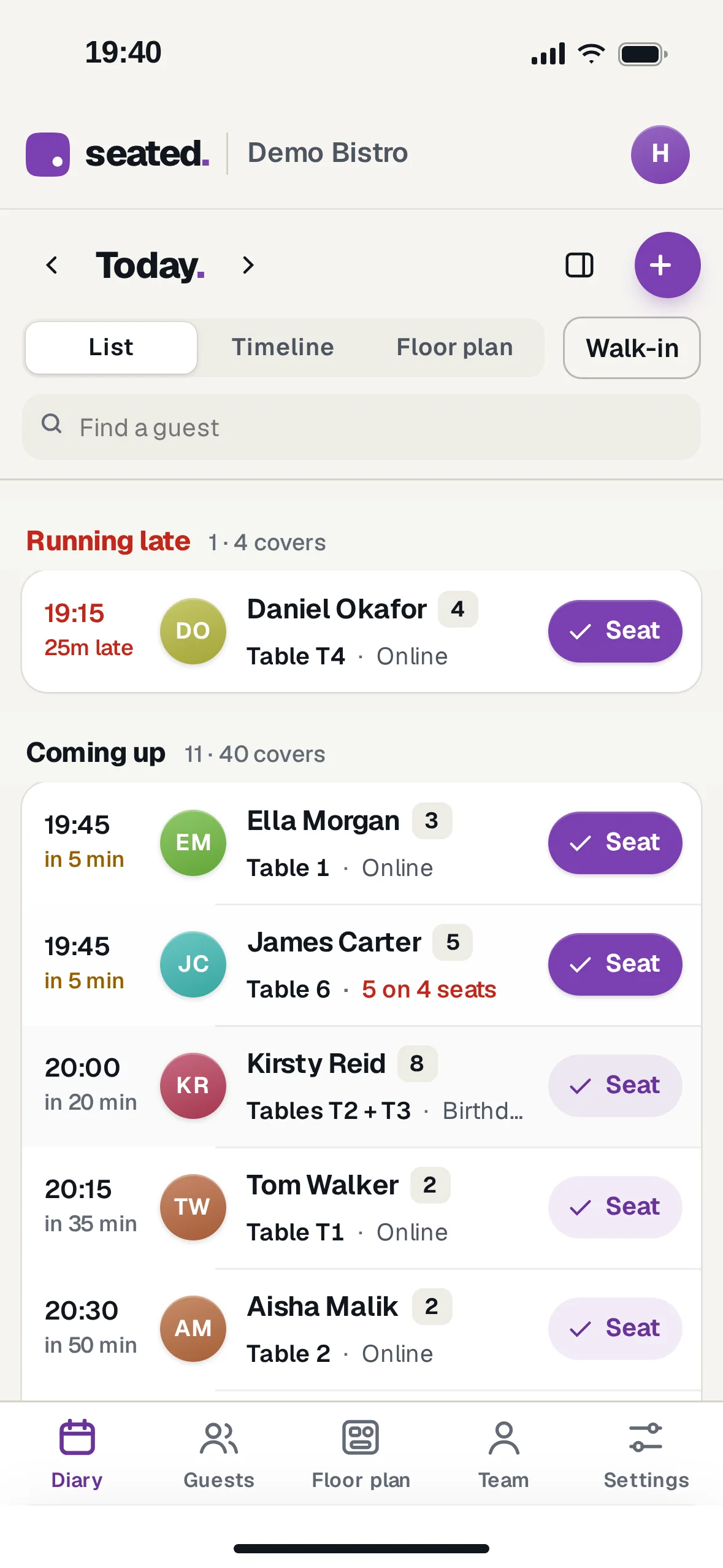
Seated on a phone: tonight's bookings in time order, a late table at the top, Seat buttons on the right
Running service

The whole night on one screen.

Tables down the side, the night across, the time now in red. Everything you'd shout across the pass, already on the screen.

Hover for the whole story.One tap for the whole story.

Rest on any booking to see who they are, how long they've got, their phone, their notes, and whether they've been before. No clicking in and out.Tap any booking to see who they are, how long they've got, their phone, their notes, and whether they've been before. On a laptop, just rest the mouse on it.

A card over Priya Shah's booking: seated, 20 minutes left, been seven times before, VIP and Regular, likes the corner table

Everything is a right-click away.

Seat, finish, no-show, move to another table, change the time or the length, call the guest. Tables that are taken say who has them. On an iPad, press and hold.

A menu on Daniel Okafor's booking: Seat now, No-show, Move to table with each table and who has it, Change time, Change length, Call

Drag, drop, done.

Pick a booking up and it follows your hand. The slot it will land in is outlined, and turns red if someone already has that table. Let go and it settles in. Change your mind and it's one tap to undo.

Aisha Malik's booking being dragged to table 6, with a dashed outline where it will land

See the rush coming.

A row along the bottom counts who's in, every fifteen minutes. Gaps between bookings are labelled, so you can see where a two-top fits before the phone stops ringing.

The bottom of the diary: covers in every fifteen minutes, peaking at 38, and a 30-minute gap labelled between two bookings
Three ways in

List, timeline or the room itself.

The same bookings, three ways round. Whoever's on the door picks the one that suits them.

The list view: late at the top, then everyone coming up in time order with a Seat button each The timeline view The floor plan view: each table coloured by who's seated, who's next and who's late
ListLate at the top, then everyone in time order. One tap to seat, finish or mark a no-show.
TimelineTables down the side, the night across. Drag to move, drag the end to change the length.
Floor planYour actual room. Every table shows who's there now and who's next. Tap a free one to seat a walk-in.
Guest profiles

Your regulars, remembered.

Every guest who books with a phone number or email gets a profile. Next time they ring, start typing their name and it's all there.

  • Notes that follow themCoeliac, likes the corner table, no ice. Written once, shown on every booking they make.
  • Tags you can see from the doorA gold star for VIPs, a cake on their birthday, allergies in red, right on the diary.
  • The full historyHow often they've been, when they last came, and any no-shows, before you take the booking.
A new booking with Priya Shah picked from the suggestions: been 8 times, VIP and Regular, likes the corner table Owen Hughes's guest card: been 3 times, Allergy tag on, coeliac note, his last three visits
Waitlist

Full tonight? Take their name.

Add walk-ins to the list in a few taps. Seated works out how long they'll wait from the timeline, counting everyone ahead of them.

  • An honest wait timeNot a guess: the first table that fits them, after the people already waiting.
  • "Your table's ready"One tap opens a text on your iPad or phone, ready to send. No text bills.
  • Seat them in one tapThey go straight onto the best free table as a walk-in.
The service panel: 19 covers in, 5 of 11 tables free, and two parties on the waitlist with how long they've waited and Text and Seat buttons
Light and dark

Built for 11pm.

Seated follows your iPad's light or dark setting, so the host stand doesn't glow across a dim room. In the afternoon sun on the terrace, it's light again.

The Seated diary in dark mode on a busy night
Laptop, iPad, phone

The host stand in your pocket.

Every part of Seated works on a phone and an iPad, and every device stays in step. Seat a table on the floor and the stand sees it a moment later.

  • Made for thumbsThe list puts late tables at the top and a big Seat button on every row.
  • Made for iPadsPress and hold a booking to move it or for its menu. Pinch to zoom the night.
  • Made for keyboardsN for a new booking, W for a walk-in, Q for the waitlist, ⌘Z to undo anything.
Seated on a phone: tonight's bookings with a late table at the top
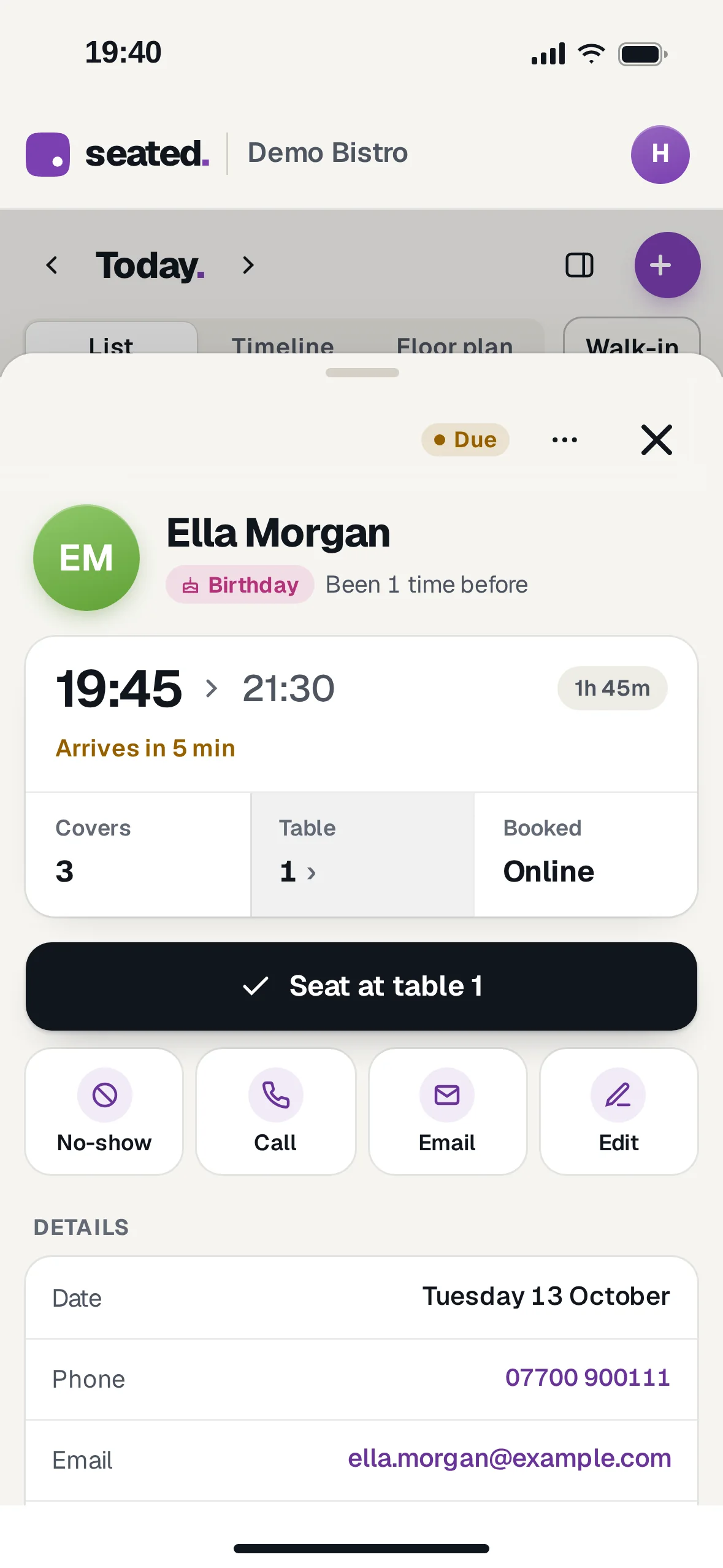
A booking opened on a phone, with the guest's details and a Seat now button
Floor plan

Draw your room in minutes.

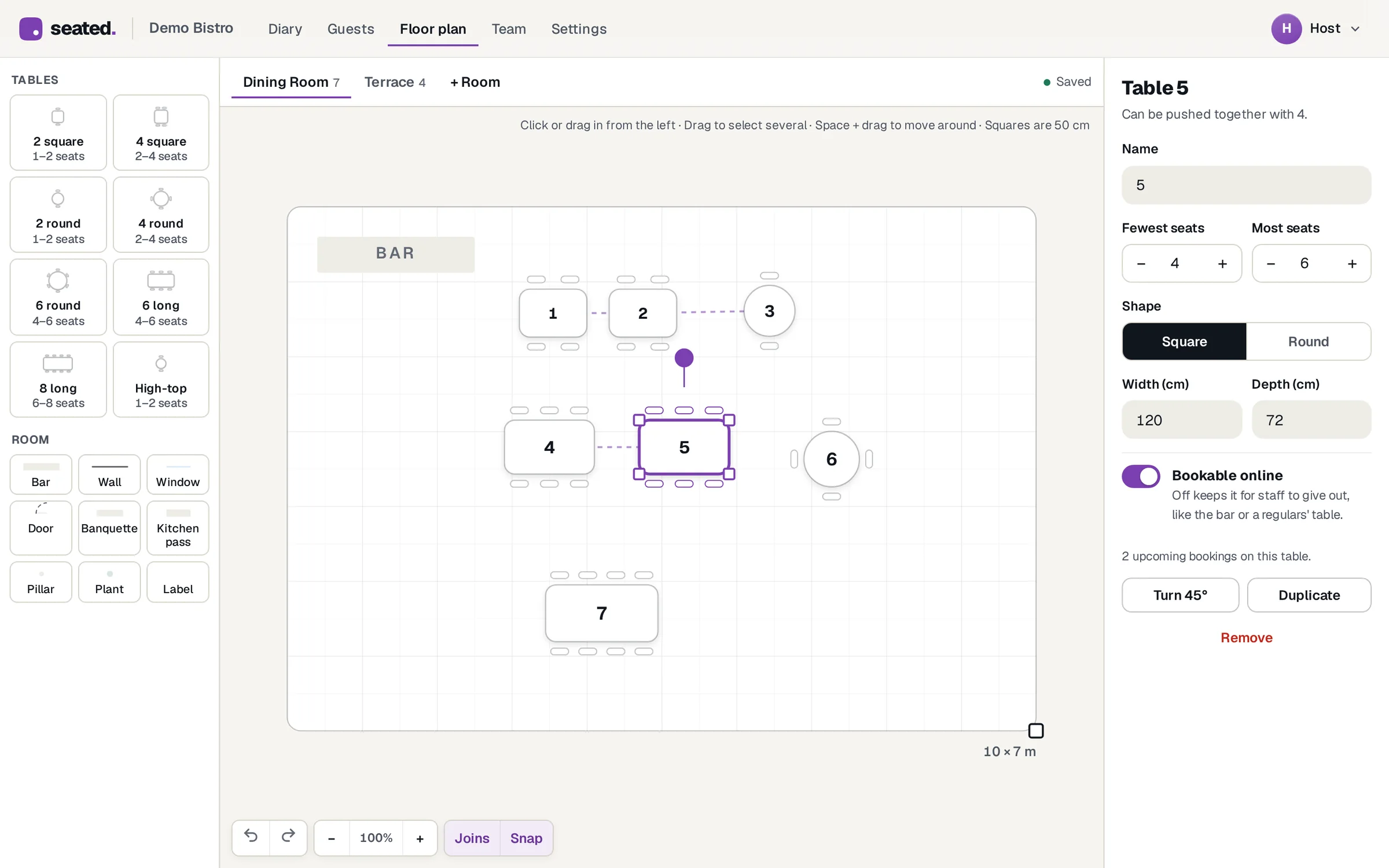
Drop in tables by how many they seat and the chairs draw themselves. Drag, turn and line them up. It saves as you go.

The Seated floor plan editor with tables, chairs and a details panel for table 5
Push tables togetherTables that sit close enough are joined for bigger groups, automatically.
Keep tables backMark the bar or the window table as staff only and it's never offered online.
Rooms close safelyClose the terrace for winter and bring it back in spring, bookings and all.
Your booking page

A booking page guests trust.

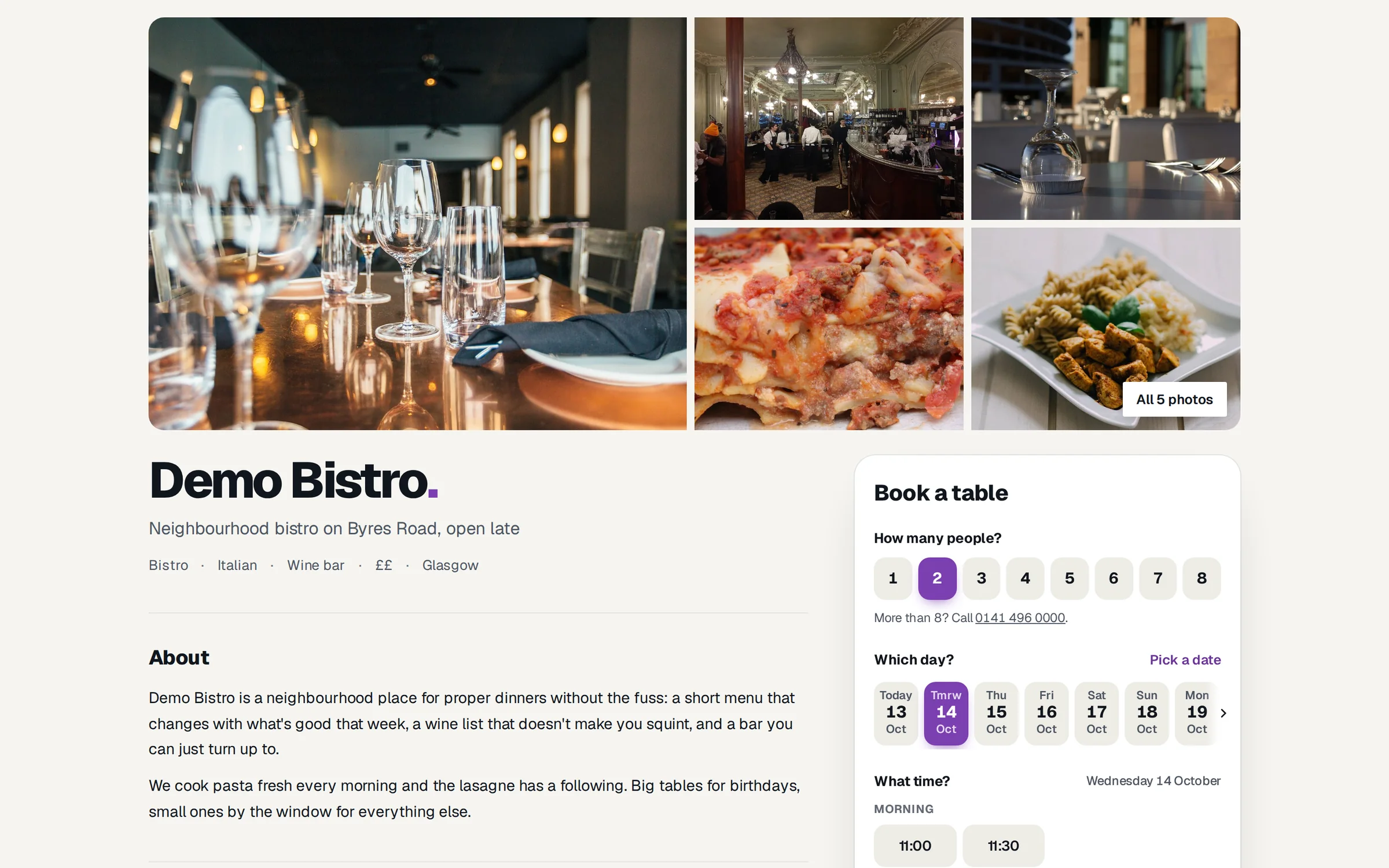
Your own page with your photos, what you're about and the times you've actually got free. No account to make, nothing to download.

  • Pace the kitchenSet the most covers you want arriving in any fifteen minutes, and online bookings spread themselves out.
  • Emails from you, not from usA confirmation, a reminder the day before and a thank-you after, with your name on them. Replies come to you.
  • Reviews that can't be fakedOnly guests who booked and came can leave one. You can reply; you can't make the stars go away.
A Seated venue page: photos, the venue's name and tagline, and a Book a table card
The small things

Built by people who've worked the floor.

No double bookingsTwo people can't take the last table at the same moment, online or on the stand.
Undo anythingMoved the wrong booking? Seated the wrong table? One tap puts it back.
Overstaying, flaggedA seated table holds until you mark it finished, and shows when it's running over.
The right accessOwners, managers and staff each see what they need. Staff run service; managers change the room.
Hours and sittingsDifferent hours each day, closed days, or set lunch and dinner sittings.
Guests' data, handledGuest details are deleted a year after their last visit, and anyone can ask to be forgotten.
Pricing

One price. Everything in it.

£29.99a month, per venue

Your first month is free. No card to start, no setup fee, no fees per booking or per guest, and no contract.

  • Diary, timeline and floor plan
  • Guest profiles and history
  • Walk-in waitlist
  • Your own booking page
  • Confirmation and reminder emails
  • Unlimited bookings and staff
Questions

Fair questions.

How much is it?

Your first month is free, then £29.99 a month per venue, everything included. No card needed to start, no fees per booking or per guest, no setup fee and no contract.

What happens when the free month ends?

If you subscribe, nothing changes. If you don't, nothing is deleted: new bookings pause, and the bookings you already have stay in your diary so you can still seat those guests.

Do my guests need an account or an app?

No. They pick a time on your booking page, give their name and email, and they're booked. Their email has a link to see or cancel it.

Do waitlist texts cost anything?

No. Tapping Text opens Messages on your own iPad or phone with the message written for you, so it's sent like any other text.

What do you keep about my guests?

Their name, contact details, visits and any notes or tags your team adds, seen only by your team. Everything is deleted a year after their last booking, and a manager can forget a guest straight away if they ask.

Does it work on a phone and an iPad?

Yes, all of it. On an iPad you press and hold a booking to move it or open its menu; on a phone the list is built for one thumb.

Can I keep some tables off online booking?

Yes. Each table has a "bookable online" switch. Staff can still book every table from the diary.

How do you stop fake reviews?

A review can only come from the link sent to a guest after their booking, and only if they weren't cancelled or a no-show. One review per booking. You can hide abusive words, but the stars always count.

From the people behind Rota Done.

Rota Done builds staff rotas with the real labour cost, for independent pubs, restaurants and cafés. Seated is its sister for the tables.

Visit Rota Done

Set the room. Open the book.

Draw your floor plan, set your hours and share your booking page. Your first month is on us.